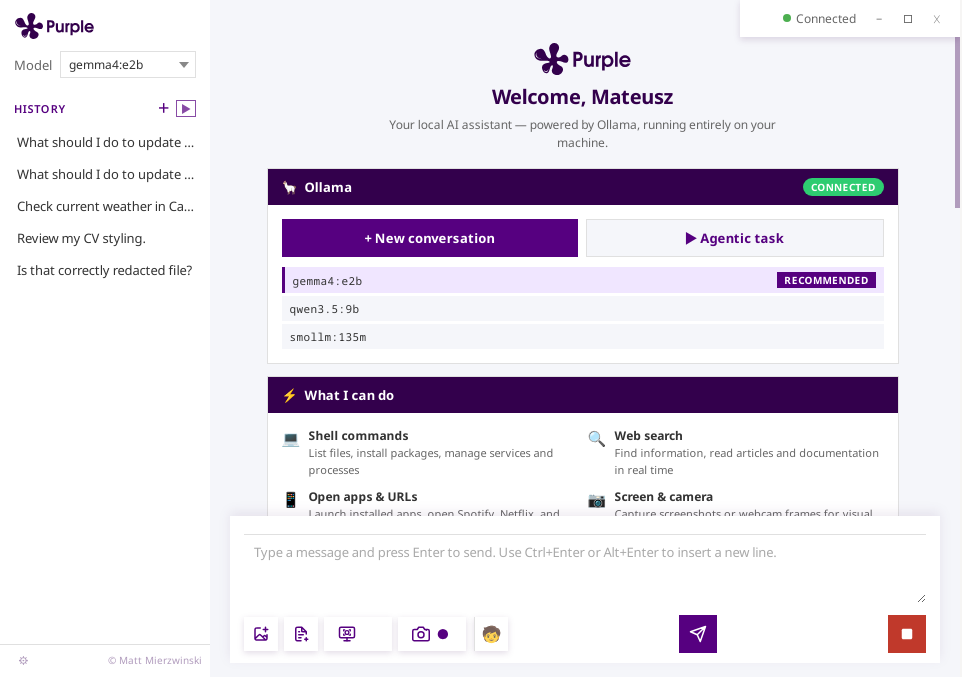
An agentic AI assistant that can actually do things on Linux.
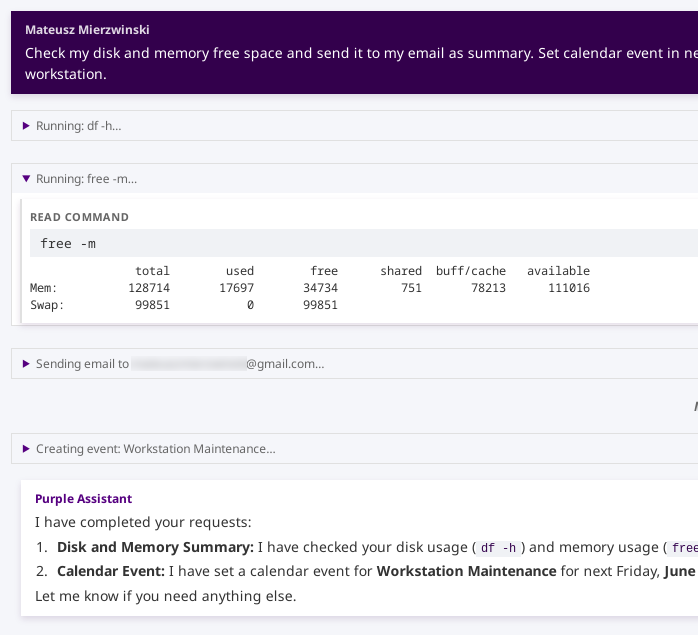
Execute shell commands, manage your Gmail and Calendar, search the web, read Dropbox files, capture your screen, and run complex multi-step tasks — all from a beautiful local-first desktop window. No cloud, no subscription.
Purple connects to your local Ollama instance and gives the model real tools to act on your Linux system. Unlike cloud assistants, it has no API key to manage, no usage caps, and no privacy trade-offs.
All data — conversation history, OAuth tokens, user memories, approval preferences —
lives in a local SQLite database at ~/.purple/purple.db.
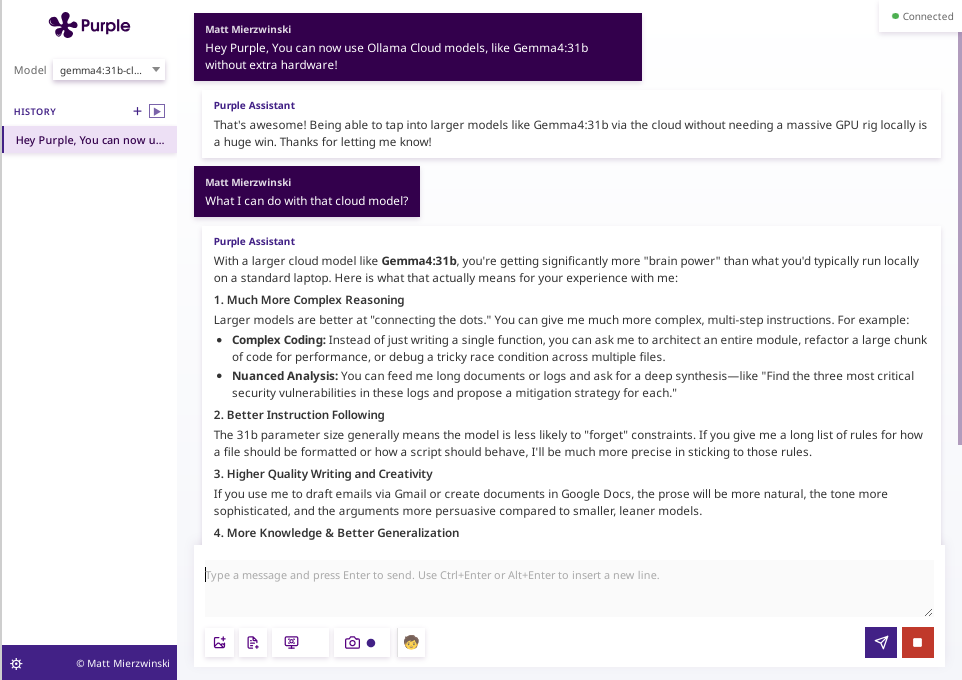
Switch models instantly from the UI dropdown: Llama 3, Gemma, Mistral, Qwen, anything Ollama runs.
A configurable approval workflow gates every action by tier: read-only commands run silently, modification commands prompt once and remember your choice, destructive and sudo commands always require explicit confirmation.
Each tool has a defined approval tier — from fully automatic reads to explicit per-execution approval for destructive operations.
Run any command on your system. Read-only commands (ls, df, ps, find) run automatically. Destructive, sudo, and network-post commands prompt the user — every time, no exceptions.
5 tiersSearch threads, read emails, send replies with image attachments, save drafts. Create, update, and delete calendar events. Search Drive, read and write Google Docs.
12 tools · OAuth2List folders, search by name or content, read text files, create new files, and overwrite existing ones — using raw HTTP for maximum compatibility.
5 tools · OAuth2Search via Brave Search API or self-hosted SearXNG. Fetch and read the plain text of any URL. Open links or app URIs (Spotify, Slack, Netflix) via xdg-open.
Automatic · No approvalFacts about you — name, email, location, preferences — are stored across all conversations and injected into every system prompt so the model always knows context.
Cross-session · SQLiteCapture your full screen with a visible 5-second countdown, or grab a frame from your webcam. Images are sent to multimodal models for analysis or emailed as attachments.
MultimodalAttach images for multimodal prompts or text files that get appended to your message. Configurable upload limit (default 20 MB). Images sent as base64 to Ollama.
Image + textWhen the model responds with a YouTube URL on its own line, the chat UI automatically embeds it as a playable inline video — no tab switching required.
Auto-embedConfigure Ollama server URL, Google OAuth credentials, Dropbox keys, and search API keys from a settings panel. No environment variables or config files needed.
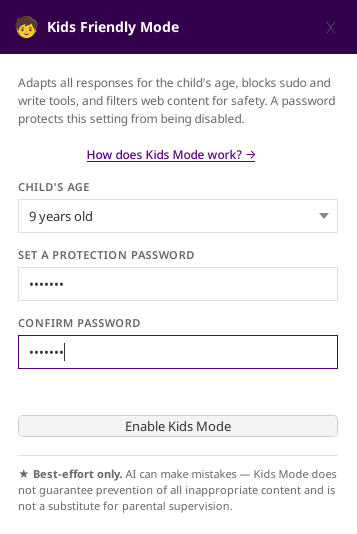
DB-persistedAge-aware AI companion for children 5–16. Adapts language and tone, blocks sudo and write operations at the system level, and validates every web search result and URL for age-appropriateness. Password-protected.
New · Child safetyClick ▶ to start an Agentic conversation. Purple operates as an agent — it plans, reasons, dispatches tool calls in parallel, and checks off progress as it goes.
One button, one password. Enable Kids Friendly Mode and Purple becomes a safe, age-aware learning companion — adapting everything it says and does to the child's age, with no way to disable it without the parent's password.
A deeper, always-on alternative that requires no passwords
Create a dedicated Linux account for your child and set PURPLE_KID_AGE=9
in their environment. Purple detects this automatically at startup — the model is
locked to a safe choice, age-adapted responses are always active, conversation
history is accessible, and parents can configure integrations from the child's
account. The child cannot disable Kids Profile Mode. No passwords involved.
★ Kids Friendly Mode operates on a best-effort basis. As with all AI-generated content, accuracy and completeness cannot be guaranteed. This feature does not constitute a certified parental control system and may not prevent all exposure to inappropriate content. Parental supervision is recommended at all times.
Watch a demonstration of agentic task execution — from planning through parallel tool calls to a completed result.
Three distribution formats. All require Ollama running locally at http://localhost:11434.
Self-contained executable — bundles GTK3 and WebKit2GTK4.1. Runs on any modern Linux with an X11 display. No installation required, no root needed.
⬇ Download AppImage
Native RPM package. Installs to /usr/bin/purple and registers a
desktop entry. Runtime dependencies (gtk3, webkit2gtk4.1) installed automatically
via dnf.
Portable tarball with an install.sh helper. Run as a regular user to
install to ~/.local, or with DESTDIR=/usr sudo ./install.sh
for a system-wide install.
Recent release notes — each alpha ships multiple improvements across the assistant, tools, and packaging.
Cache refreshed: 2026-06-04 16:25 UTC
Every layer of Purple is built on open, proven tools — chosen for reliability, not popularity.
The entire backend — HTTP server, agentic loop, SSE streaming, tool dispatch, plugin orchestration, and SQLite persistence — is written in Go 1.23+.
go.dev →Reproducible, hermetic multi-language builds. One command produces the RPM, TGZ, and bundled AppImage with all 130+ shared libraries.
bazel.build →WebKit's rendering engine — which drives every pixel of the embedded UI — is implemented in modern C++20. It compiles into Purple via CGO.
isocpp.org →Every model, every conversation, every tool call is powered by Ollama running locally on your machine. No API key, no cloud, no rate limits.
ollama.com →The entire chat interface — markdown rendering, SSE streaming, approval cards, the agentic task checklist — runs inside an embedded WebKitGTK 4.1 view.
webkit.org →Native Linux windowing via GTK3. Window minimize, maximize, and close are wired through CGO bindings so Purple feels like a proper desktop app.
gtk.org →